
Moxboard vs Trello: which board for a small team?
Moxboard vs Trello for small teams: features, Power-Ups, automation, and what 5, 8 or 10 people pay per month. Prices checked November 2026.
Trello is the better choice if your team is under 10 people, wants a free board, and likes building its own workflow out of Power-Ups and Butler rules. Moxboard is the better choice if you want structure already in place (task types, priority, WIP limits, stale-task flags, saved views), every feature on every plan for one price set by team size, and data hosted in the EU. Both are kanban tools. The difference is how much you want to assemble yourself.
TL;DR
- Trello wins on free tier (up to 10 collaborators), Power-Ups, Butler automation, native mobile apps, and Premium views such as Calendar, Table and Map.
- Moxboard wins on built-in structure (types with templates, client field, WIP limits in the column header, stale flags, saved views, per-event notifications), Timeline, Dashboard and Reports on every plan, per-workspace pricing at half of Trello Standard or less for a full team of 10, 20, 50 or 100, and EU hosting.
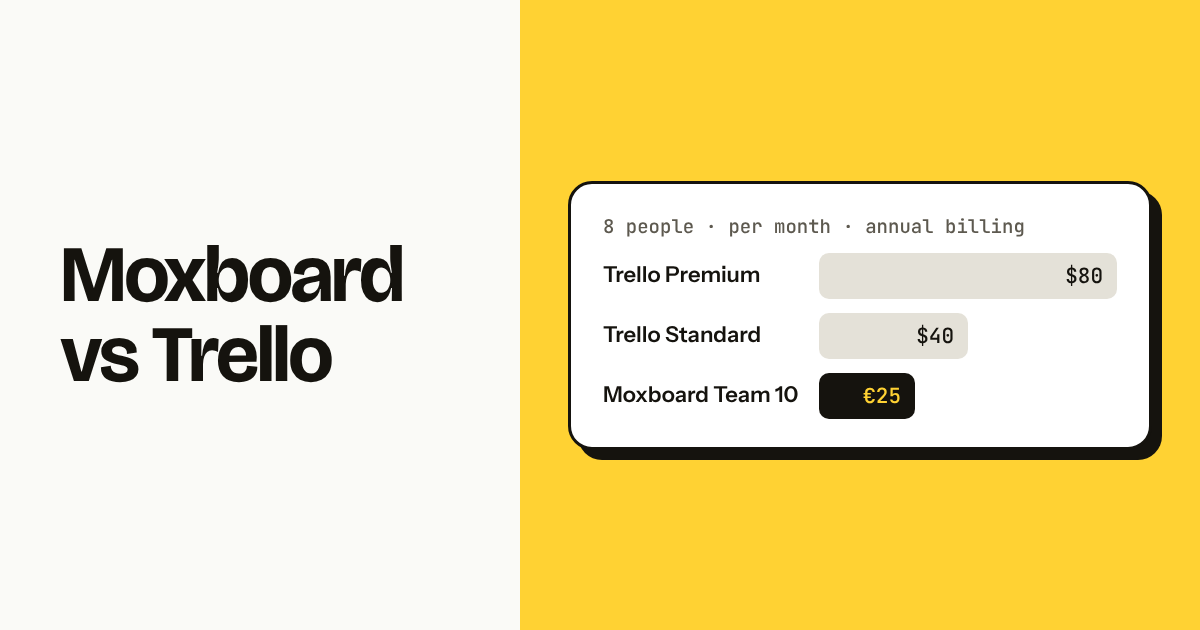
- 8 people: Trello Standard $40/month, Trello Premium $80/month, Moxboard Team 10 €25/month with everything included (annual billing, checked November 2026).
Moxboard vs Trello at a glance
Here is the factual side-by-side. Moxboard is a simple kanban board for small teams, with one price per workspace, set by team size, instead of per-user billing. Trello is Atlassian's board tool, priced per collaborator, with a large add-on ecosystem.
| Trello | Moxboard | |
|---|---|---|
| Pricing model | Per collaborator per month | Per workspace, by team size; every feature on every plan |
| Free plan | Up to 10 collaborators, 10 boards | Up to 2 members, 1 GB, every feature |
| Paid from | Standard $5/user/mo (annual), Premium $10 | Team 5 €15/mo up to 5 members, Team 10 €25/mo up to 10, Team 20 €45/mo up to 20 |
| Task types with templates | No (labels only; templates via Power-Ups) | Yes: Bug, Feature, Feedback, Improvement, Tech debt |
| Priority field | No native field | Yes: low / medium / high |
| Client field | No (custom fields on Premium) | Yes, built in |
| WIP limits | Via Power-Up | Built in, warning in the column header |
| Stale task flags | Via Power-Up (card aging) | Built in, after N days in a column |
| Saved views shared with the team | Filters per board; views on Premium | Yes, 5 per project on every plan |
| Automation | Butler (rules, buttons, scheduled commands) | No |
| Timeline / Dashboard views | Premium | Every plan, Free included |
| Reports across boards | No native cross-board reports | Reports page on every plan, with CSV and a weekly email |
| Add-on ecosystem | Power-Ups (hundreds) | None |
| Native mobile apps | iOS and Android | Installable PWA (iOS, Android, desktop) |
| Import | From other Trello boards, CSV via Power-Up | Trello JSON, Asana, CSV |
| Data hosting | Atlassian cloud, region controls on higher tiers | EU (Ireland) |
| Languages | 20+ | EN / PT / ES / FR per person |
Prices checked November 2026. Prices change; check the official pricing page before deciding: trello.com/pricing.
[Image: Moxboard board for project MOX with 12 cards across To do / In progress / In review / Done, types Bug, Feature and Feedback visible as chips, 4 assignees, In progress column header reading "3 / 3", one card flagged stale, light theme, landscape]
Where Trello is better
Trello is better when you want a free tool for up to 10 people and want to extend it yourself. These are the points where Trello wins outright.
Free for up to 10 collaborators. A workspace on Trello's Free plan holds up to 10 collaborators and 10 boards. Moxboard's Free plan stops at 2 members (with every feature). For a team of 6 that needs nothing fancy, Trello costs €0 and Moxboard costs €25/month.
Power-Ups. Trello's add-on catalog covers calendars, time tracking, card aging, voting, Google Drive, Slack, Jira and hundreds more. If your workflow needs a specific integration, there is probably a Power-Up for it. Moxboard has no add-on system.
Butler automation. Butler lets you write rules ("when a card moves to Done, mark due date complete and post to Slack"), card buttons, and scheduled commands without code. Moxboard has no automation engine. Every move is manual.
Premium views. Trello Premium adds Calendar, Timeline, Table, Dashboard and Map views on top of the board. Moxboard has board, list, Timeline and Dashboard on every plan, but no Calendar, Table or Map view.
Native mobile apps. Trello ships native iOS and Android apps with offline support and notifications. Moxboard is an installable PWA. It works on a phone, but it is not in the app stores.
Board templates. Trello's template gallery gives you a starting board for sprints, editorial calendars, hiring and more. Moxboard's templates are at the task level (description templates per type), not at the board level.
Atlassian ecosystem. If your team already uses Jira, Confluence or Bitbucket, Trello sits in the same account and shares identity and some integrations.
Where Moxboard is better
Moxboard is better when you want the structure a small team usually ends up adding to Trello by hand, already there on day one, and one price for everyone.
Task types with description templates. Every card has a type: Bug, Feature, Feedback, Improvement or Tech debt. Pick Bug and the description opens with "Steps to reproduce / What happens / What should happen". On Trello, that is a label plus a convention someone has to enforce.
Priority and client fields built in. Low, medium, high priority and a client field are standard fields, filterable and sortable, on every plan. Trello needs Custom Fields (Premium) or a Power-Up for the same thing.
WIP limits in the column header. Set a limit of 3 on In progress and the header shows "3 / 3" and warns when the column is over. No Power-Up, no plugin, no extra click. See WIP limits for a five-person team for how a small team uses this.
Stale-task flags. A card that sits in a column for more than N days gets flagged automatically. Trello's Card Aging Power-Up does something similar visually; Moxboard's flag is also a filter.
Saved views shared with the team. Build a filter (assignee + type + overdue, for instance), save it, and it appears as a pill for everyone on the project. Up to 5 saved views per project on every plan, each with its own URL.
Per-event notification preferences. Each person picks, in a grid, which events reach them on which channel: assigned to me, mentioned, comment on a task I follow, my task moved by someone else, due tomorrow, overdue, daily summary, weekly report. Email is grouped during bursts. Slack DMs are included on every plan. See notification preferences.
Full activity history per task. Every change on a card (field edits, moves, comments, attachments) is in the task's activity tab, with an "Everything" view across the project on the Activity page.
Reports across projects. A Dashboard per project (open, done this week, overdue, median time to complete, time per column, work per person) and a Reports page across the workspace: pick all or selected projects and a period, see created vs completed, cumulative flow by column, and a breakdown by person, type, label, client, priority, section, project or column, with CSV export and an optional weekly report every Monday at 8:00 by email, Slack or both. Trello has no cross-board reporting without Power-Ups, and its Dashboard view is Premium.
Per-workspace price, everything included. Up to 10 members pay €25/month total on Team 10, with Timeline and Dashboard, which on Trello are Premium. Guests who only read are free and do not count. Inviting the 11th member moves you to Team 20 at €45/month and shows you the new price before you confirm. See what counts as a member.
Trello JSON import. Export any Trello board as JSON and import it: lists become columns, cards become tasks, and labels, due dates and checklists come along. Attachments are kept as links; card comments are not imported. Guide: import from Trello.
EU data hosting. Data lives in Ireland, encrypted in transit and at rest, with row-level security and private signed links for attachments.
Four interface languages per person. English, Portuguese, Spanish and French, chosen by each member, not per workspace.
What Moxboard does not have
Moxboard has no automation, no Power-Ups, and no Calendar view. If any of those is a hard requirement today, Trello is the safer pick.
To be specific: there is no rules engine, no scheduled commands, no card buttons. There is no public API or webhooks yet (both coming soon). There is no Calendar view, no Map view, no time tracking. Timeline has no Gantt dependencies. Dashboard and Reports have fixed charts, not a custom chart builder.
What Moxboard does have is a focused kanban board with the fields a small team needs and a list view that sorts, groups and edits inline. If that is the whole job, the missing pieces may not matter.
[Image: Moxboard column header for "In progress" showing WIP limit "3 / 3" in a warning color next to a stale card badge, light theme, landscape]
Price for a whole team
Moxboard costs half of Trello Standard or less for a full team of 10, 20, 50 or 100 people, and less than Trello Premium at every size above 2, and every Moxboard plan has Timeline and Dashboard, which Trello Standard does not. Just past a size boundary the gap is small: 3 people pay the same on both (€15 against $15), 6 people pay €25 against $30, and 11 people €45 against $55. From 3 people up, Moxboard never costs more than Trello Standard. Trello is free for up to 10 collaborators if you can live without Standard and Premium features.
Monthly cost for the whole team, annual billing, checked November 2026:
| People | Trello Free | Trello Standard | Trello Premium | Moxboard |
|---|---|---|---|---|
| 3 | $0 | $15 | $30 | €15 (Team 5) |
| 5 | $0 | $25 | $50 | €15 (Team 5) |
| 8 | $0 | $40 | $80 | €25 (Team 10) |
| 10 | $0 | $50 | $100 | €25 (Team 10) |
| 20 | n/a (max 10) | $100 | $200 | €45 (Team 20) |
| 50 | n/a (max 10) | $250 | $500 | €100 (Team 50) |
Notes:
- Trello Free is capped at 10 collaborators and 10 boards per workspace. Above that you need Standard.
- Trello monthly billing is $6 (Standard) and $12.50 (Premium) per user instead of $5 and $10.
- Moxboard includes every feature on every plan, Free included. Free is up to 2 members and 1 GB. Team 5 is €15/month (20 GB), Team 10 €25/month (50 GB), Team 20 €45/month (100 GB), Team 50 €100/month (200 GB), Team 100 €175/month (500 GB); above 100 members, contact us. Yearly billing: pay 10 months, get 12.
- Moxboard prices are in EUR, VAT excluded; the same numbers apply in USD outside the euro zone. Guests do not count toward the member count.
Prices change; check the official pricing page before deciding: trello.com/pricing and Moxboard pricing.
For a wider view of tools that avoid per-user billing, see Trello alternatives without per-user pricing.
How the move from Trello works
Moving a board from Trello to Moxboard takes one JSON export and one import, and the result keeps lists, cards, labels, dates and checklists.
In Trello, open the board menu, choose Print, export and share, then Export as JSON. In Moxboard, click + next to Projects, choose Import from… → Trello, and upload the file. Lists map to columns in order, cards become tasks with their descriptions and due dates, labels become labels, checklists become checklists inside the task description. Attachments are kept as links to the original file, since Trello's export does not include the files themselves. Members are matched by name where possible; unmatched assignees are left blank for you to fix with bulk edit. Card comments stay in Trello.
You see a preview before anything is created, and importing the same file twice is detected. Nothing is deleted on the Trello side. Full steps: import from Trello.
If you only want to move some boards, or combine several into one, a CSV export and the CSV importer with column mapping works too.
Who should pick which
Pick based on team size, how much you want to configure, and whether one price for the whole team matters to you.
Choose Trello if:
- You have 10 or fewer collaborators and want a free board with no feature pressure.
- Your workflow depends on automation (Butler rules, buttons, scheduled commands).
- You need Calendar, Table or Map views today.
- You want native iOS and Android apps from the app store.
- You rely on specific Power-Ups or already live in the Atlassian ecosystem.
Choose Moxboard if:
- You want task types, priority, client, WIP limits and stale flags without adding anything.
- You are 3 to 100 people and want one price for the whole workspace, with every feature and read-only guests free.
- You want saved views shared with the team and per-event notification preferences on every plan.
- You need data hosted in the EU.
- Your team works in Portuguese, Spanish or French as well as English.
Not sure yet? Try Moxboard free: 14 days with everything, no card; after that, without a card, the workspace becomes read-only (nothing deleted) until you add one or switch to Free.
FAQ
Is Moxboard cheaper than Trello for a team of 8? Yes, against paid Trello plans. For 8 people on annual billing, Trello Standard costs $40/month and Trello Premium $80/month, while Moxboard Team 10 costs €25/month for the whole workspace, with Timeline and Dashboard included. Trello Free is $0 for up to 10 collaborators but without Standard or Premium features. Prices checked November 2026.
Can I import my Trello board into Moxboard? Yes. Export the board as JSON from Trello's board menu and upload it in Moxboard's Import screen. Lists become columns, cards become tasks, and labels, due dates and checklists come along. Attachments are kept as links to the original files, and card comments are not imported. You see a preview before anything is created.
Does Moxboard have automation like Trello's Butler? No. Moxboard has no rules engine, card buttons or scheduled commands. It has built-in structure instead: WIP limits, stale-task flags, recurring tasks, auto-archive of completed tasks, and done columns that complete tasks automatically. An API and webhooks are coming soon.
Does Moxboard have WIP limits without a Power-Up? Yes. Set a limit on any column and the header shows the count against the limit, for example 3 / 3, and warns when the column is over. It works on every plan, including Free.
Does Trello have a free plan for 10 people? Yes. Trello's Free plan allows up to 10 collaborators and 10 boards per workspace, checked November 2026. Moxboard's Free plan is limited to 2 members but has every feature; Team 5 is €15/month for up to 5 members and Team 10 €25/month for up to 10.
Where is Moxboard data hosted? In the EU, in Ireland. Data is encrypted in transit and at rest, with row-level security in the database and private signed links for attachments. Payments are handled by Stripe.
Try Moxboard free for 14 days — one board, one price, whole team.
One board. One price. Whole team.
Moxboard is a kanban board for small teams. Everything included, one price for your team size: half of Trello Standard or less for a full team of 10, 20, 50 or 100. Try it free for 14 days, no card needed.
Start free