
Claude MCP for kanban: use Moxboard from Claude
Moxboard now has an MCP server for Claude. Ask what's overdue, summarize a project or turn notes into tasks, with your permissions. Setup takes a minute.
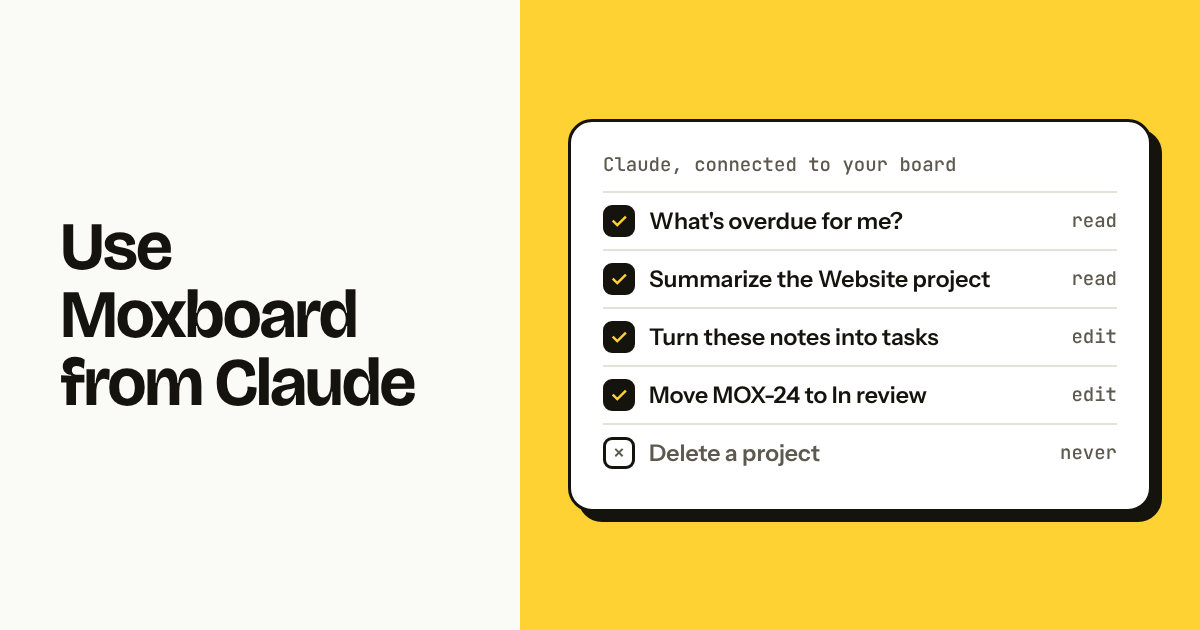
Moxboard now has an MCP server, so you can connect Claude to your kanban board and work on it by chat. Ask what's overdue, get a project summary, or turn meeting notes into tasks. Claude acts as you, with your permissions, only in the workspaces you choose, and it can't delete anything. It works on every plan, Free included, and setup takes about a minute.
TL;DR
- Add
https://app.moxboard.app/mcpas a custom connector in Claude (or with one command in Claude Code), sign in, pick workspaces and Read only or Read and edit.- Claude can search and read tasks, summarize a project, create up to 50 tasks at a time, update, move and complete tasks, and comment.
- It can't delete, invite people, touch billing or permissions, or open attachments. Every change shows in the task history as "via Claude".
What is MCP, in one paragraph?
MCP (the Model Context Protocol) is an open standard that lets AI assistants like Claude use tools from other apps. An app publishes an MCP server with a short list of actions; the assistant calls those actions when your request needs them. For Moxboard, that means Claude can read and update your board directly instead of you copying tasks into a chat and back.
What can you ask Claude to do in Moxboard?
You can ask in plain words and Claude picks the right action. Things that work well:
- "What's overdue for me this week?" Claude searches your tasks by assignee and due date and lists them with links.
- "Summarize the Website project for the last 30 days." You get open, overdue and unassigned counts, tasks per column, what was created and finished in the period, and open work per person.
- "Turn these meeting notes into tasks in MOX, assign the design ones to Ana." Claude creates up to 50 tasks in one go, at the top of the column, in the order you gave.
- "Move MOX-24 to In review and add a comment that the copy is approved." Claude updates the task and comments, signed as you.
- "What's the status of MOX-31?" Claude reads the task with its description, subtasks, the last 50 comments and recent activity.
Here is the full list of actions the server offers:
| Action | What it does | Needs edit access |
|---|---|---|
| List projects | Workspaces, projects, prefixes, columns, sections, open task counts | No |
| List people | Who is in each workspace, to assign work | No |
| Search tasks | By text, project, assignee, column, label or due date | No |
| Read a task | Description, subtasks, comments, attachment names, recent activity | No |
| Project summary | Open, overdue, unassigned, created and completed in a period, work per person | No |
| Create tasks | Up to 50 tasks or subtasks per request | Yes |
| Update a task | Title, description, dates, priority, labels, assignee, column, done | Yes |
| Comment | Adds a comment to a task | Yes |
How do you connect Claude to Moxboard?
It takes about a minute, and you never paste a password or API key into a chat.
In Claude (web, desktop and mobile)
- Open Settings → Connectors → Add custom connector.
- Name it Moxboard and paste
https://app.moxboard.app/mcp. Click Add. - Click Connect. Moxboard opens; sign in if you need to.
- Choose the workspaces Claude can use and Read and edit or Read only. Click Allow.
On Claude Team and Enterprise plans, an owner of your Claude organization may need to add the connector first.
In Claude Code
Run claude mcp add --transport http moxboard https://app.moxboard.app/mcp, then type /mcp, choose moxboard and sign in.
The same steps are in the app, in the account menu under Integrations, and in the help center. Other AI apps that support MCP with OAuth sign-in connect the same way.
Is it safe to let an AI assistant into your board?
Yes, because Claude gets no more access than you have, and less if you choose. We built it so that:
- Claude works as you. It sees only what you can see. Private projects you're not in stay hidden, and guests stay limited to their projects.
- You choose the scope. Pick the workspaces when you connect, and Read only if you just want answers.
- Some things are off-limits. No deleting tasks, projects or comments. No inviting or removing people, changing roles, billing, project privacy or settings. No opening attachments; Claude only sees their names.
- Everything is visible. Changes appear in the task history as made by you, "via Claude", so the team always knows what happened.
- You can turn it off. Disconnect from Integrations and it stops working straight away. Workspace owners and admins can switch AI apps off for the whole workspace.
- Task text is data, not orders. Titles, descriptions and comments are passed to Claude as information to read, so a task can't instruct Claude to do something else.
Your Moxboard data stays hosted in the EU. When you ask Claude about your work, the parts it reads are sent to Anthropic to answer you, under Anthropic's terms, as with anything else you share with Claude.
What it doesn't do (yet)
Being clear about the limits saves you a support ticket:
- No public API or webhooks yet. They're coming soon, on every plan. The MCP server is for AI assistants, not for scripts or other apps.
- No deleting through Claude, by design. Archive or delete in the app.
- No attachment contents. Claude sees file names and sizes, not what's inside.
- No automations. Claude acts when you ask; it doesn't run rules on its own.
Who this is for, and who shouldn't bother
It's for small teams that already use Claude and want fewer trips between chat and board: product teams turning notes into tickets, agencies checking client work before a call, founders asking "what slipped this week?" on a Monday. It pairs well with the one-board method, where everything lives in one place Claude can read.
If nobody on your team uses an AI assistant, you lose nothing by ignoring it. The board works exactly as before.
What does it cost?
Nothing extra. The Claude integration is included on every Moxboard plan, Free included, like every other feature. Moxboard is a simple kanban board for small teams, with one price per workspace by team size instead of per-user billing: free for up to 2 members, €15 a month for up to 5, €25 for up to 10, €45 for up to 20. You need your own Claude account to use Claude.
Moving from another tool first? Move your team off Asana in an afternoon, comments and attachments included.
FAQ
Does Moxboard have an MCP server?
Yes. Moxboard's MCP server is at https://app.moxboard.app/mcp. Add it as a custom connector in Claude, or with claude mcp add in Claude Code, sign in with your Moxboard account, and choose the workspaces and access level. It's included on every plan, Free included.
Can Claude delete tasks in Moxboard? No. The integration has no delete action at all. Claude can create, update, move, complete and comment on tasks if you allow editing, but deleting tasks, projects or comments only happens in the Moxboard app.
Can Claude see private projects? Only the private projects you're a member of, because Claude acts with your permissions. Projects you can't see in Moxboard stay hidden from Claude, and you can limit it further to specific workspaces when you connect.
How do I disconnect Claude from Moxboard? Open the account menu in Moxboard, go to Integrations and click Disconnect next to Claude. It stops working straight away. Workspace admins can also turn AI apps off for the whole workspace on the same page.
Does it work with AI apps other than Claude? Yes, with any app that supports MCP with OAuth sign-in. You add the same server address and sign in with your Moxboard account. Claude and Claude Code are the ones we test with.
Is there a Moxboard API? Not a public one yet. A public API and webhooks are coming soon, on every plan. Today, the MCP server is the way to work with Moxboard from an AI assistant.
Try Moxboard free for 14 days — one board, one price, whole team.
One board. One price. Whole team.
Moxboard is a kanban board for small teams. Everything included, one price for your team size: half of Trello Standard or less for a full team of 10, 20, 50 or 100. Try it free for 14 days, no card needed.
Start free