
Kanban board for small teams: the one-board method
A kanban board for small teams works best as one board for everyone. Five columns, a WIP limit, card rules and a 15-minute weekly review. Tool-agnostic.
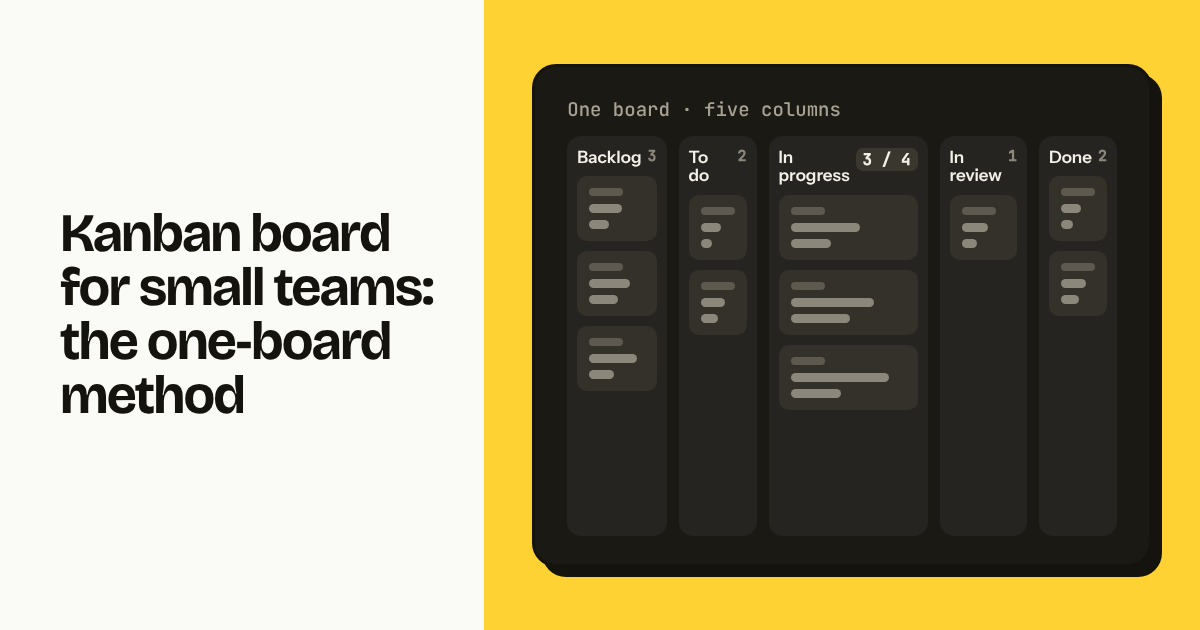
A kanban board for a small team works best when there is exactly one of it. One board for everyone, five columns, a WIP limit on In progress, a handful of card rules, and a 15-minute review once a week. That is the one-board method. It fits teams of 2 to about 15 people who share one stream of work, and it runs in any tool, including sticky notes on a wall.
TL;DR
- One board for the whole team, five columns: Backlog, To do, In progress, In review, Done. Each column has an exit rule.
- WIP limit on In progress = team size minus 1 or 2. A 5-person team runs at 3 or 4.
- Review the board right to left for 15 minutes every week. Add columns only when a real intake problem appears, and split into one board per team only when people stop sharing the same work.
Where the one-board method comes from
The method was reverse-engineered from a 5-person team that ran its whole company on a single Asana board for years and paid per seat for the privilege. Not a board per project. Not a board per department. One board with product work, sales follow-ups, support bugs, hiring tasks and invoices on it, moving left to right.
That team was DOC, a Portuguese software company. Looking at how DOC actually used Asana, the people building Moxboard found a small set of habits that did all the work: a short column list nobody changed, an unofficial cap on cards in progress, titles written as outcomes, and a weekly meeting that started at Done and walked backwards. Asana's templates, portfolios and workflow builder went unused. The bill for them did not.
Moxboard was built around those habits, which is why WIP limits and stale-task flags are column settings rather than add-ons. But nothing below requires Moxboard. The method is tool-agnostic and works in Trello, Asana, Notion, Jira or on a whiteboard.
The ideas themselves are older. David J. Anderson's 2010 book Kanban [VERIFY: link] is the origin of kanban for knowledge work: visualise the work, limit work in progress, make policies explicit, review regularly. The one-board method is the small-team subset. It drops classes of service, which are useful at 50 people and ceremony at 5, and it does not need a cumulative flow diagram, though Moxboard's Reports page draws one for you if you want to see where work piles up.
[Image: a Moxboard board showing the one-board layout with Backlog, To do, In progress (3 / 3 WIP limit shown in header), In review and Done; 12 cards with IDs MOX-18 to MOX-31, types Bug/Feature/Feedback, 4 assignees, one card flagged stale in In review, light theme, landscape]
Why one board instead of one per project?
Because a small team has one capacity, and a board is a picture of capacity. Split the work across six boards and nobody can see that the same three people are overloaded on all six. One board makes the trade-offs visible: when a new sales task enters In progress, everyone sees which product task it displaces.
A board is also only useful if people look at it. One board is one place to open on Monday morning and one thing to screen-share. Boards per project become boards nobody opens, and status moves back into chat.
Use sections, labels or a client field to tell streams apart on the same board. In Moxboard that is the section chip on the card plus the composite filter; in Trello, labels; in Asana, sections or a custom field. Filtering one board is cheap; reconciling six is not.
What are the five columns and their exit criteria?
Five columns: Backlog, To do, In progress, In review, Done. Moxboard ships with the last four as defaults; you add Backlog on the left. Each column has an exit criterion: the test a card must pass before someone drags it right. Write these where people can see them and do not drag past them.
| Column | What it holds | Exit criterion (to move right) |
|---|---|---|
| Backlog | Everything you might do. Unsorted. | Someone has decided it is worth doing in the next 2 to 4 weeks and has rewritten the title as an outcome. |
| To do | Committed, not started. Ordered top to bottom by priority. | A person picks it up, puts their name on it, and In progress is under its WIP limit. |
| In progress | Being worked on right now. | The work is done from the owner's point of view and there is something to look at: a link, a build, a draft, a screenshot. |
| In review | Waiting for someone else: a check, a client reply, a deploy window. | The reviewer accepts it, or the owner fixes it and it goes back to In progress (not straight to Done). |
| Done | Finished this week or last. | Nothing. Done cards are archived after the weekly review. |
Two details matter more than they look. To do is ordered: the top card is the next thing anyone free should take, so priority arguments happen when a card is placed, not picked up. And In review means waiting on another person, not "nearly done"; if no one else needs to look, the card skips it.
In Moxboard, Done columns auto-complete tasks with a completion date, and completed tasks auto-archive after a number of days you choose, which keeps Done short enough to read.
How big should the WIP limit be?
Team size minus 1 or 2, applied to In progress only. The limit is not a target. It is a ceiling that forces a conversation when someone wants to start a fifth thing while four are open.
| People on the board | WIP limit on In progress | Why |
|---|---|---|
| 2 | 2 | One card each. Pairing on a card counts as one. |
| 3 | 2 | One person is always reviewing, chasing or interrupted. |
| 5 | 3 to 4 | Start at 4. Drop to 3 if cards sit in In review for days. |
| 8 | 6 or 7 | Two people are typically in meetings, on support or on leave. |
| 12 | 10 or 11 | Above this, consider two boards. See the last section. |
The limit works because of what happens when it is hit. Someone wants to start a card and cannot, so they look at In review and In progress and help finish something, which is the behaviour the board exists to produce. Raise the limit only after two consecutive weekly reviews where it blocked work and nothing in review could be pushed over the line.
Moxboard applies the limit per column and shows it in the header as 3 / 3; a fourth card dragged in triggers a warning, not a block. See how WIP limits work and, for picking a number for a 5-person team, WIP limits for a five-person team.
What are the card hygiene rules?
Six rules. They take about 20 seconds per card and they make the board readable by someone who was not in the conversation.
- Title is an outcome, not an activity. "Invoice reminder email sends 3 days before due date", not "Work on invoicing". If the title does not describe the world when the card is done, rewrite it before it leaves Backlog.
- One owner. A card with two assignees has none. If two people work on it, one owns it and the other is mentioned in the description.
- Every card has an ID. MOX-24, not "the invoicing card". IDs are how cards get referenced in chat, commits and client emails. Moxboard assigns them automatically; in Trello use the card number in the URL; on sticky notes, write it in the corner.
- Due dates only when real. A due date means someone outside the team is affected if it slips: a client demo, a payroll run, a legal deadline. Internal "by Friday" dates train everyone to ignore due dates, and then the due tomorrow / overdue notifications mean nothing.
- Bugs get evidence. A bug card without a screenshot or a 20-second screen recording goes back to whoever filed it. Moxboard's Bug type has a template (steps to reproduce, what happens, what should happen) and attachments up to 100 MB per file, so the evidence lives on the card rather than in a chat thread.
- Subtasks for steps, not for scope. If a card needs more than 6 or 7 subtasks, it is two cards.
[Image: Moxboard task panel for MOX-24, a Bug-type card, showing the steps-to-reproduce template filled in, a screenshot attachment, one assignee, and a comment with an @mention, light theme, landscape]
How does the weekly right-to-left review work?
Fifteen minutes, once a week, same time, whole team, board on the screen, read from right to left.
Done (2 minutes). Read the titles aloud; this is the only moment the team sees what it finished. Then archive. Moxboard's weekly progress indicator and auto-archive handle the mechanics, and the optional Monday weekly report (email or Slack) puts last week's numbers in front of everyone before the meeting starts.
In review (4 minutes). Every card here is waiting on somebody. Who, and since when? Cards waiting more than a few days get a decision: chase, take over, or send back to In progress. This is where the stale-task flag earns its place: Moxboard marks a card after N days in a column; set it to 3 or 4 for In review. See stale tasks.
In progress (4 minutes). Is the WIP limit respected? Is anything stuck? Nobody reports status; the card is the status. A card here two reviews in a row should probably be split.
To do (3 minutes). Is the top card still the right next thing? Reorder if priorities moved. Pull nothing into In progress during the meeting.
Backlog (2 minutes). Delete anything older than about 8 weeks that nobody argues for. A backlog of 200 cards is a backlog of zero cards.
Right to left matters because it spends attention on finishing before starting. Left-to-right reviews turn into planning sessions and the stuck cards on the right never come up.
What should not go on the board?
Four things. Keeping them off matters as much as the column rules.
- Recurring chores with no decision in them. Daily backups, weekly invoicing runs, monthly reporting. They clutter the board and dilute the WIP limit. If you must track them, use recurring tasks that appear only on their day (Moxboard's daily/weekly/monthly recurrence), or a checklist elsewhere.
- Someday ideas. "Rebuild the website" with no commitment goes in a notes document. The Backlog is for things you will plausibly do within a month or two.
- Personal to-dos. "Book dentist" belongs in your own list. The board is the team's picture of team work.
- Meeting notes and documents. A card can link to a document; it should not be one. A 2,000-word card description means a wiki is missing. Moxboard has no docs feature; paste the link from whatever you use.
When should you add a Feedback or Bugs intake column?
Only when unsorted inbound items start landing directly in To do and skipping triage. The symptom is a To do column where the top three cards are whatever a client said most recently, not what the team decided was next.
The fix in most tools is an intake column left of Backlog, named Inbox or Triage, where anything from outside the team lands first and gets rewritten, merged or deleted in the weekly review. That works, but it is a sixth column, and six columns on a laptop is where horizontal scrolling starts.
In Moxboard, the alternative is to keep five columns and use task types. New items come in as type Bug or Feedback, and a saved view filtered to type: Bug, Feedback and column: Backlog is the intake queue. The person on triage opens that view, rewrites titles, attaches screenshots, and either changes the type or deletes the card. Saved views are shared and appear as pills above the board. See saved views.
Use the column if your tool has no task types or saved filters. Use the filter if it does. Not both.
When does one board stop being enough?
When people on the board stop sharing one stream of work. The practical signal is that in the weekly review, half the room has nothing to say about half the cards. The board is then two boards wearing one name.
Head count is a rough proxy. Around 15 people per board, In progress alone holds 12 or 13 cards and the review no longer fits in 15 minutes. Most teams hit the shared-work problem first, often at 8 to 10 people when a second product or a dedicated sales team appears.
When you split, split by team, not by project: product, sales, support. Keep the same five columns and exit criteria on every board, so anyone can read any board and moving a card between boards does not change its meaning. One WIP limit per board, sized for that team. One 15-minute review per board, not one 45-minute review for three boards.
In Moxboard, each board is a project and the price does not change with the number of boards. The one-board method costs attention, not money, in every tool, with one exception: per-seat pricing, where adding the designer who looks once a week costs real money. That is covered in why per-seat pricing punishes small teams.
[Image: diagram of the five columns with exit criteria written beneath each and the WIP limit highlighted on In progress, light theme, landscape]
FAQ
How many columns should a small team's kanban board have? Five: Backlog, To do, In progress, In review, Done. Fewer than four and you cannot tell waiting from working. More than six and the board needs horizontal scrolling on a laptop. Add an intake column only when inbound items keep skipping triage, or use task types and a saved filter instead.
What WIP limit should a 5-person team use? Three or four on the In progress column. Start at 4. If cards pile up in In review, drop to 3. The rule of thumb for any small team is team size minus 1 or 2, because at any moment someone is reviewing, in a meeting or interrupted.
Should a small team use one kanban board or one per project? One board for the whole team, as long as the team shares one stream of work. One board shows total capacity and trade-offs; several boards hide them. Use labels, sections or a client field to separate projects on the same board. Split into one board per team at roughly 15 people or when half the team stops caring about half the cards.
Does the one-board method require a specific tool? No. It works in Trello, Asana, Notion, Jira, Moxboard or sticky notes. You need columns, a way to cap cards in one column, card IDs and a weekly meeting. Moxboard builds WIP limits and stale flags into the column, which saves manual counting, but the method itself is a set of habits.
Try Moxboard free for 14 days — one board, one price, whole team.
One board. One price. Whole team.
Moxboard is a kanban board for small teams. Everything included, one price for your team size: half of Trello Standard or less for a full team of 10, 20, 50 or 100. Try it free for 14 days, no card needed.
Start free