
How to move your team off Asana in an afternoon
A step-by-step plan to move your team off Asana in one afternoon: export a backup, import to Moxboard, invite people, map sections, run both a week.
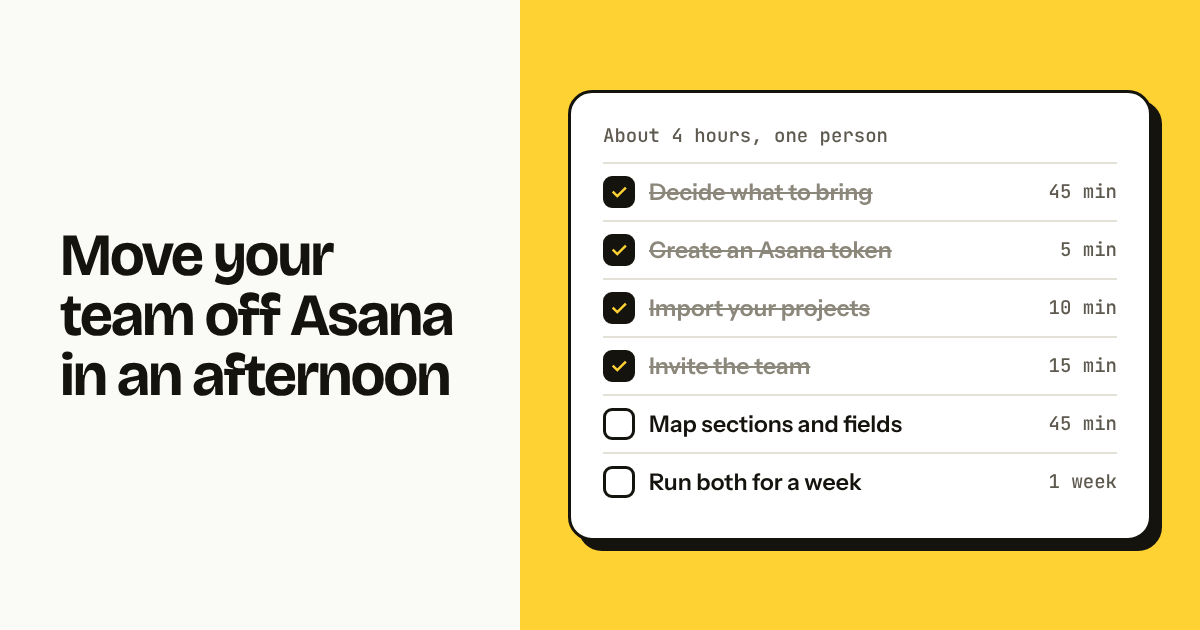
You can move a small team off Asana in about four hours: pick the projects worth keeping, export a CSV backup, import them into Moxboard with an Asana personal access token, invite the team, map sections and custom fields, set notifications, then run both tools for a week before you cancel. The import runs in the background. Most of the afternoon goes to deciding what to bring.
TL;DR
- Budget 3 to 4 hours of one person's time, plus a week of running Asana and Moxboard side by side.
- Tasks, subtasks, sections, assignees, dates, tags, followers, comments and attachments up to 100 MB come over. Portfolios, goals, rules, forms and workload do not.
- For a team of 8, the bill goes from $87.92/month (Asana Starter, annual) to €25/month (Moxboard Team 10, everything included), checked November 2026.
Step 1: decide what to bring (45 minutes)
Import only the projects your team touched in the last 90 days; archive the rest in Asana and keep a CSV export as a backup. This step decides whether the afternoon stays an afternoon.
Sort your Asana projects by last modified and put each in one of three buckets:
- Import: active work, open tasks, people still assigned. Usually 3 to 8 projects for a team of 5 to 10.
- Archive in Asana, do not import: finished projects you may need to look up. Export to CSV and leave them.
- Delete: test projects, duplicates, the "Ideas 2023" list nobody opened since 2023.
For the backup, open each project in Asana, use the project menu and choose Export → CSV [VERIFY: exact Asana menu path for CSV export].
If you have more than about 10 active projects, merge some. Moxboard has sections inside a board, so three Asana projects for three clients can become one board with three sections. See the one-board method.
Step 2: create a Moxboard workspace (5 minutes)
Sign up at app.moxboard.app with your work email. You get 14 days with everything, no card. After the trial, if you haven't added a card, the workspace becomes read-only until you add one or click Switch to Free; nothing is deleted (/help/free-trial). Name the workspace after your company, not the project.
Step 3: create an Asana personal access token (5 minutes)
Moxboard reads your Asana data through a personal access token. In Asana, open My settings → Apps → Personal access tokens → Create new token [VERIFY: exact Asana menu path]. Copy the token once; Asana will not show it again.
The token has the same access you have. If you are not a member of a project, Moxboard cannot see it either; have the project owner run the import for those. Revoke the token once the import is done.
Step 4: import your Asana projects (10 minutes of clicking, then wait)
In Moxboard, click the "+" next to Projects in the sidebar, choose Import from… → Asana, paste the token, and tick the projects from step 1. Each Asana project becomes a Moxboard project with its own board.
What comes over:
| Asana | Moxboard |
|---|---|
| Tasks and subtasks | Tasks and subtasks (one level) |
| Sections | Columns or sections (you choose during import) |
| Assignee | Assignee, matched by email |
| Due date, start date | Due date, start + due range |
| Tags | Labels |
| Followers | Followers |
| Comments | Comments, with author and time |
| Attachments up to 100 MB each | Attachments, stored in Moxboard |
| External links (Drive, Dropbox) | Kept as links, not copied |
Assignees are matched by email, so the import is cleanest when the team is already invited (step 5); otherwise the task arrives unassigned and you fix it with bulk edit. The import runs in the background and can be cancelled from the same screen. Full reference: /help/import-from-asana.
[Image: Moxboard import screen with the Asana option selected and three projects ticked, progress bar at 60%, light theme, landscape]
Step 5: invite the team and set roles (15 minutes)
Invite everyone by email and give each person one of four roles: owner (billing), admin (manages members and projects), member (creates and edits tasks) or guest (read-only, sees only the projects you choose). Owners, admins and members count toward your plan's team size; guests are free and do not.
The guest role matters if part of your Asana bill came from clients. In Asana, anyone who edits a task is a paid seat. In Moxboard, a client can read, follow and get notified as a guest without affecting the price; if they need to add tasks, make them a member. See /help/roles-and-guests.
Pending invitations count toward the plan, so invite only the people you mean to keep.
Step 6: map Asana sections and custom fields to Moxboard (45 minutes)
During the import you choose whether Asana sections become Moxboard columns or sections; if your sections were clients or areas rather than stages, make them Moxboard sections, and move custom fields into type, priority, labels or the client field. Give this the longest block of the afternoon.
Start with what Asana sections were doing for you:
- Sections as workflow stages (To do, Doing, Review, Done): keep them as columns. Mark the last one as a done column so tasks there auto-complete with a completion date.
- Sections as categories (Client A, Client B, Marketing, Ops): convert them to Moxboard sections, which show as a chip on each card and as groups in list view. Use the four default columns for stage.
- Sections as sprints or months: use a label or a due date range instead.
Asana custom fields do not import as fields, so decide where each one lands:
| Asana custom field | Moxboard home |
|---|---|
| Priority | Priority (high/medium/low) |
| Type, Category, Request type | Type: Bug, Feature, Feedback, Improvement, Tech debt |
| Client, Account | Client field |
| Other fixed-value fields | Labels |
| Estimates, story points | No equivalent; description or drop |
| Free text | Description |
Some Asana concepts have no equivalent in Moxboard:
- Portfolios: no status roll-up across projects. Use fewer projects with sections, the My tasks and Activity pages for cross-project views, and the Reports page (every plan) for numbers across all or selected projects: created vs completed, cumulative flow by column, and a breakdown by project, person or column, with CSV export.
- Goals: coming soon; until then a saved view per objective.
- Rules and automations: no rules engine. Recurring tasks, auto-complete in done columns, auto-archive and stale-task flags cover the common cases; "when priority is High, assign to Maria" has to become a habit.
- Forms: coming soon. For now, a shared inbox or a CSV import of requests.
- Workload: no capacity planning. The Dashboard (every plan) shows open work per person, and WIP limits per column do a cruder version of the job: the header warns when too much is in progress (/help/columns).
- Timeline and Gantt: Moxboard's Timeline shows start and due dates as bars you can drag, but has no dependencies. If you depend on dependencies, keep that project in Asana.
While you are here, set a WIP limit on In progress (team size minus one or two), a stale-task flag at 7 or 10 days, and auto-archive at 14 or 30 days. Then create two or three saved views: "My open tasks", "Overdue", "This week by person".
[Image: Moxboard board after an Asana import, 12 tasks across To do / In progress / In review / Done with types Bug, Feature and Feedback, 4 assignees, In progress header showing 3 / 3, one card with a stale flag, sections shown as chips, light theme, landscape]
Step 7: set notification preferences (10 minutes per person)
Ask each person to open their notification preferences and spend five minutes on the grid: rows are events (assigned to me, mentioned, comment on a task I own or follow, my task moved or completed by someone else, due tomorrow, overdue, daily summary, weekly report), columns are channels (email, Slack). Nobody is notified about their own actions, and email groups bursts.
A starting point: email for assigned and mentioned; Slack DM (every plan, each person connects their own account) for comments and moves; daily summary at 8:00 on weekdays for the rest. If your team is used to Asana's status updates, turn on the weekly report: last week's numbers, every Monday at 8:00, by email, Slack or both. Details at /help/notification-preferences.
Step 8: run both for a week, then cancel Asana (1 week elapsed, 30 minutes of work)
Keep Asana read-only for five working days, with the rule that all new work goes in Moxboard, then export your Asana data and cancel. The week catches what you forgot: the client who still sends Asana links, the recurring task nobody re-created, the project someone kept private.
Before you cancel:
- Export every Asana project you did not import to CSV, including archived ones. Admins can also request a full workspace export in JSON
[VERIFY: exact Asana admin export path]. - Download attachments from projects you did not import; the CSV only lists them.
- Revoke the personal access token.
- Cancel from the Asana admin console. On annual billing you keep access until the term ends, so time the switch to the renewal date.
The cost line for a team of 8 (checked November 2026): Asana Starter at $10.99 per seat billed annually is $87.92 per month. Moxboard Team 10, for up to 10 members, is €25 per month, or €250 per year, with every feature included. Prices change; check the official pricing page before deciding: asana.com/pricing and /pricing.
What won't come over from Asana
Moxboard imports tasks and what hangs off them; it does not import Asana's layer above tasks:
- Portfolios, goals and status updates
- Rules, automations and workflow builder
- Forms
- Workload and capacity views
- Timeline, Gantt and dependencies between tasks
- Custom fields as fields (values can be moved to type, priority, labels or client)
- Milestones (they arrive as ordinary tasks)
- Project descriptions and briefs
- Task templates
- Private tasks in My Tasks that are in no project
- Time tracking data
- Integrations configured in Asana (Slack channels, Google Drive, Zapier)
If three or more of these are load-bearing for your team, read Moxboard vs Asana first, and the alternatives roundup for tools that keep more of the Asana feature set.
FAQ
How long does it take to move a team off Asana? About half a day of one person's work for a team of 5 to 10: 45 minutes deciding what to bring, 10 minutes on signup and the token, a background import, 45 minutes mapping sections and fields, then a week of running both tools before cancelling Asana.
Does the Asana import bring comments and attachments? Yes. Comments come over with author and timestamp, and attachments up to 100 MB per file are copied into Moxboard. External links to Google Drive, Dropbox or Box stay as links. Followers, tags, dates, subtasks and sections come over too. Custom fields, rules, forms and portfolios do not.
Can I run Asana and Moxboard at the same time? Yes, and we recommend a week of overlap. Keep Asana read-only, put all new work in Moxboard, and use the week to find forgotten recurring tasks, private projects and clients still using Asana links. Then export the rest of Asana to CSV and cancel.
How much do I save by moving 8 people from Asana to Moxboard? Checked November 2026: Asana Starter costs $87.92 per month for 8 people on annual billing; Moxboard Team 10 costs €25 per month for up to 10 members. Over a year that is $1,055.04 against €250. Asana Starter includes forms, rules and task dependencies, which Moxboard does not have today.
What if my team depends on Asana rules or timeline? Moxboard has no rules engine, and its Timeline has no dependencies. Recurring tasks, done-column auto-complete, auto-archive and stale flags cover simple automations. For dependency-driven project planning, keep that project in Asana, or pick a tool from the alternatives list that has it today.
Try Moxboard free for 14 days — one board, one price, whole team.
One board. One price. Whole team.
Moxboard is a kanban board for small teams. Everything included, one price for your team size: half of Trello Standard or less for a full team of 10, 20, 50 or 100. Try it free for 14 days, no card needed.
Start free