
Best Asana alternatives for small teams (2026)
Eight Asana alternatives for small teams: real monthly price for 8 people, kanban quality, Asana import and what you give up. Checked November 2026.
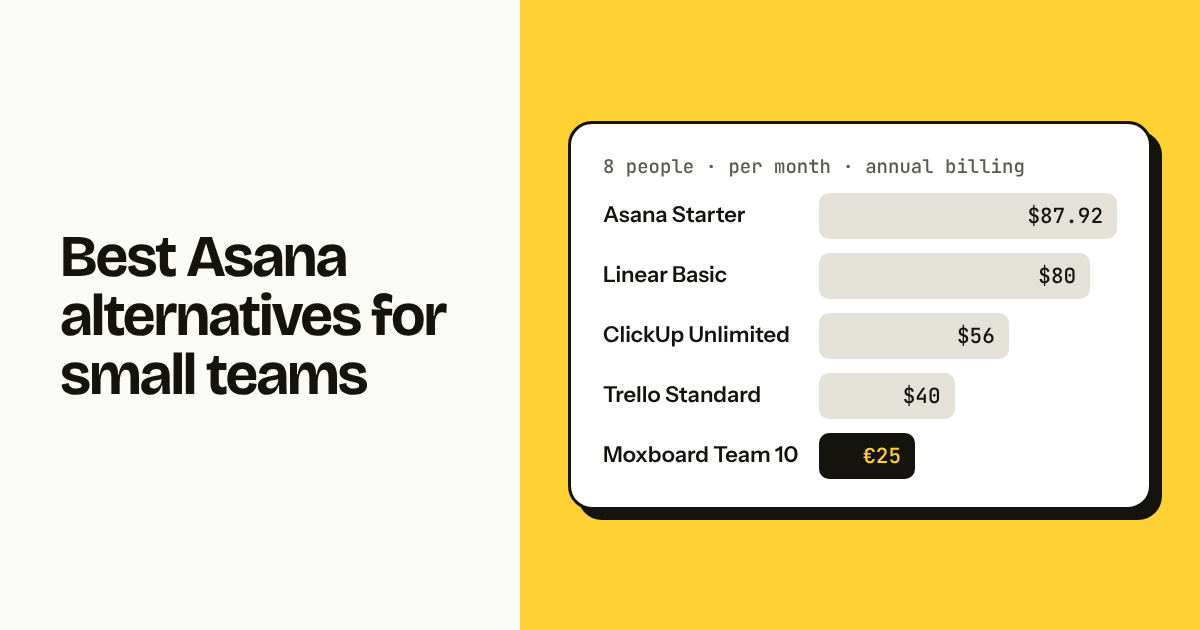
The best Asana alternatives for a small team are Trello if you want the simplest board, Moxboard if you want kanban with everything included and one price for your team size, ClickUp if you want everything Asana does for less, and Linear if you ship software. monday.com, Notion, Jira and Basecamp each fit a narrower case. Below: what each costs for 8 people, where it beats Asana, and what you lose.
TL;DR
- For 8 people, Asana Starter is $87.92 a month. Trello Standard is $40, Moxboard Team 10 is €25, ClickUp Unlimited is $56, Linear Basic is $80 (checked November 2026).
- Pick by what you actually use: a board (Trello, Moxboard), a full work-management suite (ClickUp, monday.com), engineering issues (Linear, Jira), docs plus tasks (Notion), or a flat-rate company tool (Basecamp).
- Stay on Asana if your team relies on portfolios, goals, workload, rules or approvals. Nothing on this list replaces all five.
How we compared these tools
We judged each tool on six things that matter to a team of five to fifteen people, not to a 500-person program office. Every price below is for 8 people on annual billing, checked November 2026. Prices change; check the official pricing page before deciding.
- Price for a whole team of 8. Not the per-seat number. The monthly total, including minimums and seat buckets.
- Learning curve. Can a new hire add a card and move it on day one without a tutorial.
- Kanban quality. Columns, WIP limits, swimlanes or sections, filters, and whether the board is the primary view or a side view of something else.
- Import from Asana. Native importer, CSV only, or nothing.
- Guests and clients. Whether you can show a board to a client or freelancer, and whether that person costs money.
- What you lose. Every tool here drops something Asana does. We name it.
For reference, Asana itself: Personal is free for up to 10 users but has no timeline, no custom fields and no dashboards. Starter is $10.99 per user per month billed annually ($13.49 monthly), with a seat minimum of 2. Advanced is $24.99. See asana.com/pricing. Eight people on Starter is $87.92 a month, or $1,055 a year. If you want that math broken down, read How much does Asana cost for 8 people.
[Image: Side-by-side bar chart of monthly cost for 8 people across the 8 tools and Asana Starter, light theme, landscape]
1. Trello: the simplest board, per-user from the first paid plan
Trello is the tool most people picture when they say "kanban." A board, lists, cards, drag and drop. It is owned by Atlassian and has had fifteen years to polish the basics. The free plan allows up to 10 collaborators per workspace and 10 boards, which covers many small teams for a long time. Structure beyond lists and cards comes from Power-Ups, and automation comes from Butler.
Price for 8 people (checked November 2026): Free if you stay under 10 collaborators and 10 boards. Standard is $5 per user per month annually ($6 monthly), so $40 for 8. Premium is $10 ($12.50 monthly), so $80 for 8, and adds Calendar, Timeline, Table and Dashboard views. See trello.com/pricing.
Best for: Teams that want zero learning curve and a huge template library, and that are happy to live inside a board with Power-Ups for anything else.
Where it falls short: No task types, priority field or WIP limits without a Power-Up. The free plan caps you at 10 boards, which is one per client for a small agency. The moment you want more than Free, the bill is per user, and Premium for 8 people costs almost as much as Asana Starter. Asana import exists but is basic. More in Trello alternatives without per-user pricing and Moxboard vs Trello.
2. Moxboard: kanban for small teams, one price for your team size
Moxboard is a simple kanban board for small teams, with one price per workspace, set by team size, instead of per-user billing, and every feature on every plan. We build it, so read this entry with that in mind. It started inside DOC, a Portuguese software company, as the board its own 5-person team needed after paying Asana per seat for what was, in practice, one board. Each project is a board with To do, In progress, In review and Done by default. You get WIP limits per column, stale-task flags after a set number of days, task types with description templates (Bug, Feature, Feedback, Improvement, Tech debt), priorities, sections by client or area, subtasks, recurring tasks, a list view, composite filters and saved views shared with the team.
Price for 8 people (checked November 2026): Team 10 is €25 a month for up to 10 members. Yearly is €250: pay 10 months, get 12. Team 5 is €15 for up to 5 members, Team 20 €45 for up to 20, Team 50 €100 for up to 50, Team 100 €175 for up to 100, and Free covers up to 2. Every plan includes every feature, including Timeline, Dashboard, Reports across projects and Slack notifications. USD prices are the same numbers outside the euro zone. Guests are read-only and free. See /pricing.
Best for: Teams of 2 to 100 who want a proper kanban board, want to import their Asana projects with history, and are tired of recalculating the bill every time someone joins or leaves.
Where it falls short: We are honest about this. Moxboard has a Timeline (no Gantt dependencies), a Dashboard per project and Reports across projects on every plan (fixed charts, no custom chart builder), but no automations or rules engine, no time tracking and no public API yet. API and webhooks are coming soon, without dates. There is no docs or wiki module and no native Git integration. If your Asana setup leans on rules, portfolios or workload, Moxboard is not a replacement today. For the full head-to-head, see Moxboard vs Asana.
[Image: Moxboard board for project MOX with 12 tasks across To do / In progress 3 / 3 / In review / Done, types Bug, Feature and Feedback visible as chips, 4 assignees, one card flagged stale in In review, light theme, landscape]
3. ClickUp: nearly everything Asana does, for less
ClickUp is the maximalist option. Tasks, docs, whiteboards, goals, time tracking, dashboards, chat, forms, automations, Gantt, mind maps. Most of Asana Advanced's feature list is in ClickUp Unlimited or Business. The trade is complexity: ClickUp has a hierarchy of workspace, space, folder, list and task, and dozens of settings per view. Teams that invest a weekend in setup tend to stay; teams that don't tend to bounce.
Price for 8 people (checked November 2026): Free Forever allows unlimited users with storage and feature limits. Unlimited is $7 per user per month annually ($10 monthly), so $56 for 8. Business is $12 ($19 monthly), so $96. Business Plus is $19. See clickup.com/pricing.
Best for: Teams that want Asana's breadth, including dashboards, time tracking and automations, at roughly 60 percent of the Asana Starter price, and that have one person willing to own the configuration.
Where it falls short: The learning curve is the steepest on this list. Performance on large workspaces has been a recurring complaint. The sheer number of options means two people on the same team can set up two very different structures. The Asana import is native and reasonably complete, but you will still spend time deciding which ClickUp concepts map to your Asana projects and sections.
4. monday.com: colorful boards sold in seat buckets
monday.com Work Management is a spreadsheet-like board tool with strong visual polish, good automations and dashboards on higher plans. Items live in groups within boards, and each column is a typed field (status, person, date, number). The kanban view is one of several views on a board, not the center of the product.
Price for 8 people (checked November 2026): Free is up to 2 seats. Basic is $9 per user per month annually ($12 monthly), Standard $12 ($14), Pro $19 ($24). There is a 3-seat minimum and seats are sold in buckets: 3, then multiples of 5. So 8 people on Basic is 8 × $9 = $72 on paper, but seats are sold in buckets, so in practice 10 seats = $90. See monday.com/pricing.
Best for: Teams that want a colorful, structured tracker for non-engineering work (marketing, operations, client onboarding) and will use automations and dashboards from day one.
Where it falls short: Seat buckets mean you often pay for people who do not exist. Basic has no timeline, no integrations and no automations; those start at Standard, which is $120 for 10 seats. The kanban view lacks WIP limits. Asana import is via CSV or third-party connectors rather than a one-click native tool.
5. Linear: the engineering team's issue tracker
Linear is built for software teams and makes no attempt to be anything else. Issues, cycles (sprints), projects, roadmaps, triage, and deep Git integration with GitHub and GitLab: branch names, auto-closing on merge, PR status on the issue. It is fast, opinionated, keyboard-first and widely admired for its design.
Price for 8 people (checked November 2026): Free includes 250 issues and 2 teams. Basic is $10 per user per month annually ($12 monthly) with 5 teams, so $80 for 8. Business is $16 and adds guests, private teams, Insights and Asks. See linear.app/pricing.
Best for: Product and engineering teams that run cycles and want their tracker wired to their repositories.
Where it falls short: It is not a general work tool. Marketing, sales or operations teams will find the vocabulary (issues, cycles, triage) and the workflows do not fit. Guests require the Business plan at $16 per user. Basic for 8 people costs $80, close to Asana Starter. Asana import is available through Linear's importer. If you are weighing Linear against a plain board, see Moxboard vs Linear.
6. Notion: docs first, boards as database views
Notion is a documents and knowledge tool where any page can hold a database, and any database can be shown as a table, board, calendar, list, gallery or timeline. Many small teams run tasks in a Notion database with a board view, right next to meeting notes and specs. The appeal is one place for everything written.
Price for 8 people (checked November 2026): Free for individuals. Plus is about $10 per user per month annually ($12 monthly), so about $80 for 8. Business is about $20 [VERIFY]. See notion.com/pricing.
Best for: Teams whose work is mostly writing (specs, docs, research, content) and who want tasks to live beside the documents rather than in a separate tool.
Where it falls short: The board is a view of a database, not a purpose-built kanban. There are no native WIP limits, no stale-task detection and no per-column rules. Notifications are generic. Each board is only as consistent as the person who set up the database properties. Asana import exists as a native importer, but comments and attachments do not come across cleanly. Per-user pricing applies to everyone who edits.
7. Jira: free for 10, built for engineering
Jira Software is Atlassian's issue tracker for development teams. Scrum and kanban boards, backlogs, sprints, releases, a powerful query language (JQL), and a very large marketplace. For a small engineering team, the free tier is generous.
Price for 8 people (checked November 2026): Free for up to 10 users. Standard is about $7–8 per user per month [VERIFY exact Jira Standard price], varying by tier and region, so roughly $56–64 for 8. Premium is about $14–16. See atlassian.com/software/jira/pricing.
Best for: Engineering teams up to 10 people who want a free, capable tracker and may already use Confluence or Bitbucket.
Where it falls short: Jira is heavy for anything that is not software. Configuring workflows, schemes and permissions takes real time. Non-engineers tend to avoid it. The kanban board is good, with WIP limits and swimlanes, but the overall interface is dense. Asana import is via CSV. Once you pass 10 users, the per-user bill starts.
8. Basecamp: flat rate for the whole company
Basecamp takes a different shape from everything above. Instead of boards, each project has to-dos, a message board, a schedule, docs and files, and a group chat. There is a card table (kanban) view for to-dos, added in recent years. 37signals, the company behind it, has made flat pricing a point of principle: one price for the whole organization, regardless of headcount, on its higher plan.
Price for 8 people (checked November 2026): pricing: flat per organization [VERIFY current Basecamp price]. There is also a lower per-user plan [VERIFY]. We will not quote a number we have not confirmed this month.
Best for: Companies that want one calm tool for projects, discussion and files, with a predictable bill, and that do not need a sophisticated kanban board.
Where it falls short: Basecamp is not board-centric. The card table is adequate but lacks WIP limits, task types and the filtering depth of dedicated kanban tools. There are no dashboards, no Gantt, no custom fields in the Asana sense. Asana import is not native; you would export CSV and rebuild. For a team of 8 that only wants a board, a flat company price may still cost more than Moxboard Team 10 or Trello Standard, depending on the current Basecamp rate.
Comparison table: 8 tools for 8 people
Prices are monthly, annual billing, for 8 people (checked November 2026). Prices change; check the official pricing page before deciding.
| Tool | Price for 8 people | Pricing model | Kanban strength | Asana import | Guests |
|---|---|---|---|---|---|
| Asana Starter (reference) | $87.92 | Per user, 2-seat minimum | Good board view, no WIP limits | n/a | Free guests with limits |
| Trello Standard / Premium | $40 / $80 | Per user; Free up to 10 collaborators | Strong basics; WIP and fields via Power-Ups | Basic | Free up to the collaborator cap |
| Moxboard Team 10 | €25 | Per workspace by team size, everything included | Native WIP limits, stale flags, types, sections | Full, with comments and attachments | Free, read-only |
| ClickUp Unlimited | $56 | Per user; Free Forever tier | Good; many views | Native | Limited free guests |
| monday.com Basic | $90 (10 seats) | Per user, 3-seat minimum, 5-seat buckets | One view among many; no WIP limits | CSV / connectors | Viewers on higher plans |
| Linear Basic | $80 | Per user; Free up to 250 issues | Strong for engineering | Native importer | Business plan only |
| Notion Plus | ~$80 [VERIFY] |
Per user | Database view; no WIP limits | Native, partial | Guests with limits |
| Jira Standard | ~$56–64 [VERIFY] |
Per user; Free up to 10 | Strong, with WIP and swimlanes | CSV | Per-user |
| Basecamp | [VERIFY current Basecamp price] |
Flat per organization | Basic card table | CSV rebuild | Free clients |
For why the per-user column matters more than it looks, read Why per-seat pricing punishes small teams and What is per-workspace pricing.
How to leave Asana without losing history
You can leave Asana and keep your tasks, subtasks, comments and attachments if the destination has a token-based importer rather than a CSV one. CSV exports from Asana carry titles, assignees, dates, sections and custom fields, but not comments or attachments. That is the main thing people lose.
Three practical steps:
- Archive what is finished. Export Asana projects you no longer touch as CSV and store them. Do not migrate dead projects into a new tool.
- Import live projects with the richest importer available. Moxboard connects with an Asana personal access token and brings tasks, subtasks, sections, assignees matched by email, dates, tags, followers, comments and attachments up to 100 MB each. It runs in the background and can be cancelled. See /help/import-from-asana. ClickUp and Linear also have native Asana importers; check what each one drops.
- Run both for one week. Keep Asana read-only while the team works in the new tool. Nothing forces you to cancel on day one; Asana Personal is free for up to 10 users, so downgrading costs nothing while you check.
The full walkthrough, with timings, is in Move your team off Asana in an afternoon.
[Image: Moxboard Asana import screen showing a project selected, progress bar at 62 percent, counts of tasks, comments and attachments imported, light theme, landscape]
Who should stay on Asana
Stay on Asana if your team depends on five things: portfolios, goals, workload, rules and approvals. These are Asana's strongest features and most alternatives on this list either lack them or implement them more thinly.
- Portfolios roll many projects into one status view. ClickUp and monday.com have equivalents; Trello, Moxboard, Notion and Basecamp do not (Moxboard's Reports page rolls up numbers across projects, not status).
- Goals link work to company objectives. ClickUp has Goals. Moxboard lists Goals as coming soon. Others require workarounds.
- Workload shows who is over capacity across projects. This is Asana Advanced territory, and only ClickUp and monday.com come close.
- Rules automate moves, assignments and notifications. Trello has Butler, ClickUp and monday.com have automations, Moxboard has none yet.
- Approvals turn a task into a sign-off request. Few alternatives have a direct equivalent.
If you use two or more of those every week, the savings from switching are not worth the disruption. If you use none of them, and you are paying $87.92 a month for a board, you have options.
FAQ
What is the cheapest Asana alternative for a team of 8? For 8 people, the cheapest paid options are Moxboard Team 10 at €25 a month for the whole team and Trello Standard at $40 (checked November 2026). Jira Free and Trello Free cost nothing up to 10 users, with limits. Asana Starter for the same 8 people is $87.92.
Which Asana alternative has the best kanban board? For a pure kanban board, Trello and Moxboard are the strongest. Trello wins on templates, Power-Ups and mobile apps. Moxboard includes WIP limits, stale-task flags, task types, sections, Timeline, Dashboard and Reports natively. Jira and Linear have excellent boards but are built for engineering teams.
Can I import my Asana projects with comments and attachments? Yes, if the destination uses Asana's API rather than CSV. Moxboard's importer uses a personal access token and brings tasks, subtasks, sections, assignees, dates, tags, followers, comments and attachments up to 100 MB each. ClickUp and Linear also have native importers; CSV-based imports drop comments and attachments.
Is ClickUp a good replacement for Asana? ClickUp covers most of Asana's feature list, including dashboards, time tracking, automations and goals, for $7 per user per month on Unlimited (checked November 2026). The trade is a steeper learning curve and more setup. It suits teams that want breadth and have someone to own configuration.
Does Asana have a free plan for small teams? Yes. Asana Personal is free for up to 10 users and includes list, board and calendar views with unlimited tasks and projects. It lacks timeline, custom fields, dashboards, forms and rules, which start on Starter at $10.99 per user per month billed annually (checked November 2026).
What do I lose if I leave Asana for a simpler tool? Typically portfolios, goals, workload, rules and approvals. Trello, Moxboard, Notion and Basecamp do not offer most of these. If your team uses them weekly, stay. If you only use boards and tasks, you lose little and may save more than half the bill.
Try Moxboard free for 14 days — one board, one price, whole team.
One board. One price. Whole team.
Moxboard is a kanban board for small teams. Everything included, one price for your team size: half of Trello Standard or less for a full team of 10, 20, 50 or 100. Try it free for 14 days, no card needed.
Start free